Branch: SuperMega Branch, Lincoln
0 £0.00
products in your basketto quote To basket
Ooops no items were found.
Try something else.
Ok
Loading…
USP Strip
Click & Collect
Click & Collect
Ready in 15 minutes
Free Delivery
Free Delivery
On all orders (exclusions apply)
About Us
About Us
Meet the team

How to Design the Perfect Media Wall for Your Space

11 min

How to Design the Perfect Media Wall: Your Guide to Entertainment Bliss

Let's be honest – we've all been there. You're binge-watching your favorite series, and suddenly you're distracted by the tangle of cables behind your TV, or you're squinting because the lighting is all wrong, or worse yet, you can't find the remote because there's nowhere logical to put it. Sound familiar?

If you're nodding along, it might be time to consider designing a proper media wall. Trust me, it's not as complicated as it sounds, and the payoff is absolutely worth it. A well-designed media wall can transform your living space from chaotic cable central into a sleek entertainment hub that actually makes sense.

What Exactly Is a Media Wall?

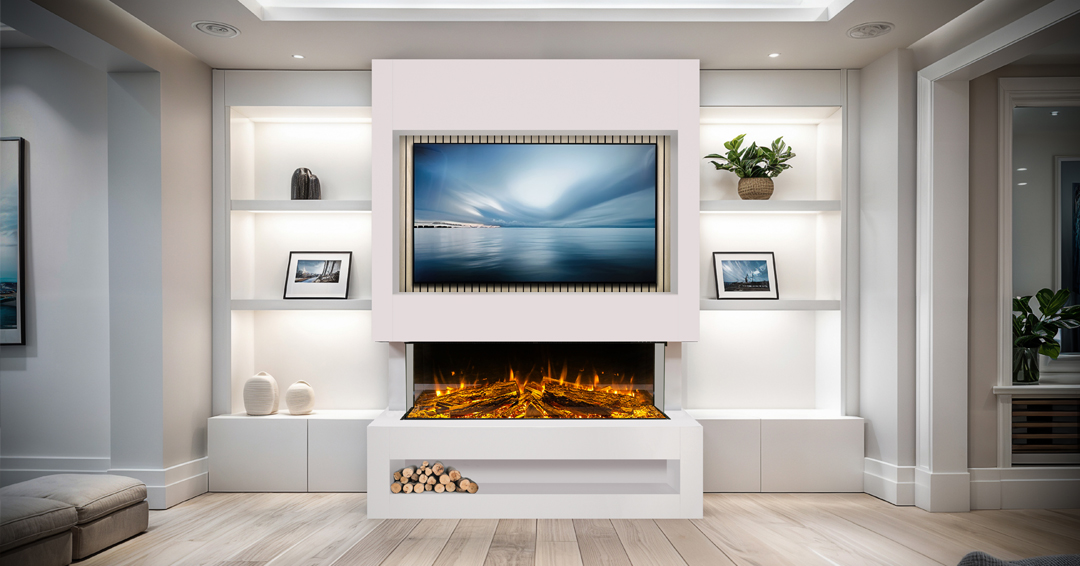
Before we dive into the nitty-gritty, let's get on the same page about what we're talking about. A media wall is essentially a dedicated wall space designed specifically around your entertainment setup. Think of it as the command center for all your viewing pleasure – your TV, sound system, gaming consoles, streaming devices, and all the bits and bobs that make modern entertainment possible.

The beauty of a media wall is that it brings everything together in one cohesive, organized space while hiding all the ugly stuff (I'm looking at you, cable mess) and showcasing the good stuff.

Key Factors to Consider Before You Start

1. Room Layout and Viewing Angles

This is probably the most important factor, and it's where a lot of people go wrong. You want to think about where people will actually be sitting when they're watching TV. The general rule of thumb is that your TV should be at eye level when you're seated – nobody wants a crick in their neck from looking up at a TV mounted too high.

Also, consider the room's natural traffic flow. You don't want your media wall blocking a major walkway or making the room feel cramped. If you have a long, narrow room, you might want to consider an angled setup rather than having everything flush against one wall.

2. Lighting Conditions

Here's something that often gets overlooked until it's too late: lighting. You need to think about both natural light and artificial lighting. If your media wall is going to be opposite a big window, you might deal with glare issues during certain times of day. On the flip side, if it's in a dark corner, you'll want to plan for some ambient lighting so the space doesn't feel like a cave.

Consider installing some LED strip lighting behind your TV or around your media wall – it reduces eye strain and creates a really nice ambiance for movie nights.

3. Power and Connectivity

This is the unsexy but absolutely crucial part. Before you start mounting anything or building anything, you need to think about power outlets and cable management. How many devices will you need to plug in? Where are your current outlets? Do you need to add more?

If you're doing any kind of built-in setup, now's the time to run cables through the walls. Future you will thank present you for taking care of this properly from the start.

4. Future-Proofing

Technology moves fast, and what works today might not work in five years. Try to design your media wall with some flexibility in mind. Maybe that means making sure you have extra HDMI ports, or leaving some extra space for future devices, or choosing a TV mount that can accommodate different sizes.

Maximizing Your Space Like a Pro

Vertical Storage Solutions

One of the biggest mistakes people make is only thinking horizontally. Your wall goes up, so use that vertical space! Floating shelves are your best friend here. You can create storage for your media devices, books, decorations, or whatever else you want to display.

The key is to think in layers. Maybe your TV goes in the middle, with floating shelves above and below. Or perhaps you create a whole grid system with different sized compartments for different purposes.

Hidden Storage Magic

This is where you can really maximize space while keeping things clean. Consider incorporating closed storage into your media wall design. This could be as simple as a TV stand with doors and drawers, or as elaborate as custom built-ins with hidden compartments.

Hidden storage is perfect for all those things you need but don't necessarily want to look at – extra cables, remotes, gaming controllers, DVDs (yes, some of us still have them), and all the other random stuff that accumulates around entertainment areas.

Multi-Functional Furniture

Why have furniture that only does one thing when you can have furniture that does three things? Ottoman storage, TV stands with built-in wine racks, shelving units that double as room dividers – there are tons of options out there.

If you're handy with DIY projects, this is a great area to get creative. You could build a media console that also serves as a bench, or create shelving that incorporates a desk area for those times when you need to work while keeping an eye on the game.

Corner Utilization

Corners are often wasted space, but they don't have to be. Corner shelving, corner TV mounts, or even angled media walls can help you make use of every square inch. This is especially useful in smaller rooms where every bit of space counts.

Keeping It Clean and Stylish

Cable Management Is Everything

I cannot stress this enough – good cable management will make or break your media wall. Messy cables don't just look bad; they make everything feel chaotic and unfinished, no matter how nice your actual setup is.

There are tons of cable management solutions out there. Cable raceways can hide cables along walls, cable boxes can corral power strips and excess cable length, and cable ties keep everything neat and organized. If you're mounting your TV, consider getting a mount that includes cable management features.

For a really clean look, running cables through the wall is the gold standard, but it's not always practical depending on your situation.

Color Coordination and Materials

This might seem obvious, but it's worth mentioning: try to keep your color palette cohesive. If you have a black TV, black speakers probably make more sense than white ones. If your room has warm wood tones, incorporate some of that into your media wall design.

The same goes for materials. Mixing materials can look great, but it takes some thought. Maybe you combine wood and metal, or wood and stone, but try to have some unifying element that ties everything together.

The Power of Symmetry (and When to Break It)

Symmetrical designs tend to look clean and organized, which is usually what you want in a media wall. This might mean having matching shelves on either side of your TV, or creating a balanced arrangement of your components.

But don't be afraid to break symmetry if it serves a purpose. Maybe you need more storage on one side, or the room layout calls for an asymmetrical approach. The key is making it look intentional rather than accidental.

Negative Space Is Your Friend

Here's a design principle that a lot of people forget: you don't have to fill every inch of space. Sometimes leaving some areas empty actually makes the whole setup look cleaner and more sophisticated. It gives your eye a place to rest and prevents the wall from looking cluttered.

This is especially important if you have a lot of components or decorative items. A little breathing room goes a long way.

Design Styles to Consider

Minimalist Modern

If you're into clean lines and simplicity, a minimalist approach might be perfect. Think floating TV, minimal shelving, hidden storage, and a very restrained color palette. The focus is on functionality and clean aesthetics.

Industrial Chic

Exposed brick, metal shelving, Edison bulb lighting – industrial style can work really well for media walls, especially if you want something with a bit more character and texture.

Built-In Traditional

For a more classic look, consider built-in cabinetry that looks like it was always part of the room. This approach often works well in more traditional homes and can add real value to your property.

Eclectic Mix

Maybe you don't want to stick to one style. That's totally fine! You can mix different elements as long as you have some unifying theme – maybe it's color, maybe it's material, maybe it's just your personal taste.

Common Mistakes to Avoid

Mounting the TV Too High

I mentioned this earlier, but it's worth repeating because it's such a common mistake. Your TV should be at eye level when you're seated, not up near the ceiling. Yes, it might look dramatic, but your neck will hate you.

Ignoring Acoustics

Sound is half the entertainment experience, but a lot of people focus so much on the visual aspects that they forget about audio. Think about where your speakers will go, how sound will travel in the room, and whether you need any acoustic treatments.

Not Planning for Heat Dissipation

Electronic devices generate heat, and if they can't dissipate that heat properly, they'll run poorly and die early. Make sure your components have adequate ventilation – don't cram everything into tight, enclosed spaces without airflow.

Forgetting About Maintenance

You're going to need to dust things, replace cables, update devices, and generally maintain your setup. Design your media wall so you can actually access everything when you need to. Future you will appreciate being able to reach that HDMI port without moving furniture.

Budget-Friendly Tips

DIY Where It Makes Sense

You don't need to hire professionals for everything. Floating shelves, basic cable management, and simple mounting jobs are totally doable for most people. Save the professional help for electrical work or complex built-ins.

Shop Smart for Components

You don't need the most expensive everything. Focus your budget on the items that will have the biggest impact – usually your TV and sound system – and save money on things like cables and basic storage solutions.

Phase Your Project

You don't have to do everything at once. Maybe start with the basic TV mounting and cable management, then add storage and decorative elements over time. This spreads out the cost and lets you live with the setup for a while before making additional changes.

Repurpose What You Have

Before buying new furniture, see if you can repurpose existing pieces. Maybe that old bookshelf could work as a media console with some modifications, or those floating shelves from your old place could find new life in your media wall.

Making It Work in Small Spaces

Go Vertical

In small spaces, vertical storage is even more important. Consider floor-to-ceiling solutions that make use of all available wall space.

Multi-Purpose Everything

Every piece should serve multiple functions. Storage ottoman, TV stand with shelving, wall-mounted desk that folds down – get creative with pieces that do double or triple duty.

Light Colors and Mirrors

Light colors make spaces feel bigger, and strategically placed mirrors can create the illusion of more space. Consider incorporating these elements into your media wall design.

Keep It Simple

In small spaces, less is often more. A simple, clean design will make the space feel larger than a complex, busy one.

The Final Touch: Making It Personal

At the end of the day, your media wall should reflect your personality and lifestyle. Maybe that means incorporating your book collection, displaying your gaming achievements, or creating a gallery wall that combines your TV with your favorite artwork.

Don't be afraid to add personal touches that make the space uniquely yours. After all, this is where you'll be spending a lot of your relaxation time, so it should feel like home.

Wrapping It Up

Designing a great media wall isn't rocket science, but it does require some thoughtful planning. Think about how you actually use your space, plan for both current and future needs, and don't forget that sometimes the best solution is the simplest one.

Remember, the goal isn't to create something that looks like a showroom (unless that's what you want) – it's to create something that works for your life and makes your entertainment time more enjoyable. Whether that's a simple floating TV with some basic cable management or an elaborate built-in entertainment center, the best media wall is the one that makes you happy every time you use it.

Take your time with the planning phase, don't be afraid to ask for help when you need it, and most importantly, have fun with the process. Your future binge-watching sessions will thank you!


What's your media wall looking like? Are you team minimalist or team maximalist? Drop a comment and let us know what's working (or not working) in your setup!

How to Design the Perfect Media Wall for Your Space

11 min

How to Design the Perfect Media Wall: Your Guide to Entertainment Bliss

Let's be honest – we've all been there. You're binge-watching your favorite series, and suddenly you're distracted by the tangle of cables behind your TV, or you're squinting because the lighting is all wrong, or worse yet, you can't find the remote because there's nowhere logical to put it. Sound familiar?

If you're nodding along, it might be time to consider designing a proper media wall. Trust me, it's not as complicated as it sounds, and the payoff is absolutely worth it. A well-designed media wall can transform your living space from chaotic cable central into a sleek entertainment hub that actually makes sense.

What Exactly Is a Media Wall?

Before we dive into the nitty-gritty, let's get on the same page about what we're talking about. A media wall is essentially a dedicated wall space designed specifically around your entertainment setup. Think of it as the command center for all your viewing pleasure – your TV, sound system, gaming consoles, streaming devices, and all the bits and bobs that make modern entertainment possible.

The beauty of a media wall is that it brings everything together in one cohesive, organized space while hiding all the ugly stuff (I'm looking at you, cable mess) and showcasing the good stuff.

Key Factors to Consider Before You Start

1. Room Layout and Viewing Angles

This is probably the most important factor, and it's where a lot of people go wrong. You want to think about where people will actually be sitting when they're watching TV. The general rule of thumb is that your TV should be at eye level when you're seated – nobody wants a crick in their neck from looking up at a TV mounted too high.

Also, consider the room's natural traffic flow. You don't want your media wall blocking a major walkway or making the room feel cramped. If you have a long, narrow room, you might want to consider an angled setup rather than having everything flush against one wall.

2. Lighting Conditions

Here's something that often gets overlooked until it's too late: lighting. You need to think about both natural light and artificial lighting. If your media wall is going to be opposite a big window, you might deal with glare issues during certain times of day. On the flip side, if it's in a dark corner, you'll want to plan for some ambient lighting so the space doesn't feel like a cave.

Consider installing some LED strip lighting behind your TV or around your media wall – it reduces eye strain and creates a really nice ambiance for movie nights.

3. Power and Connectivity

This is the unsexy but absolutely crucial part. Before you start mounting anything or building anything, you need to think about power outlets and cable management. How many devices will you need to plug in? Where are your current outlets? Do you need to add more?

If you're doing any kind of built-in setup, now's the time to run cables through the walls. Future you will thank present you for taking care of this properly from the start.

4. Future-Proofing

Technology moves fast, and what works today might not work in five years. Try to design your media wall with some flexibility in mind. Maybe that means making sure you have extra HDMI ports, or leaving some extra space for future devices, or choosing a TV mount that can accommodate different sizes.

Maximizing Your Space Like a Pro

Vertical Storage Solutions

One of the biggest mistakes people make is only thinking horizontally. Your wall goes up, so use that vertical space! Floating shelves are your best friend here. You can create storage for your media devices, books, decorations, or whatever else you want to display.

The key is to think in layers. Maybe your TV goes in the middle, with floating shelves above and below. Or perhaps you create a whole grid system with different sized compartments for different purposes.

Hidden Storage Magic

This is where you can really maximize space while keeping things clean. Consider incorporating closed storage into your media wall design. This could be as simple as a TV stand with doors and drawers, or as elaborate as custom built-ins with hidden compartments.

Hidden storage is perfect for all those things you need but don't necessarily want to look at – extra cables, remotes, gaming controllers, DVDs (yes, some of us still have them), and all the other random stuff that accumulates around entertainment areas.

Multi-Functional Furniture

Why have furniture that only does one thing when you can have furniture that does three things? Ottoman storage, TV stands with built-in wine racks, shelving units that double as room dividers – there are tons of options out there.

If you're handy with DIY projects, this is a great area to get creative. You could build a media console that also serves as a bench, or create shelving that incorporates a desk area for those times when you need to work while keeping an eye on the game.

Corner Utilization

Corners are often wasted space, but they don't have to be. Corner shelving, corner TV mounts, or even angled media walls can help you make use of every square inch. This is especially useful in smaller rooms where every bit of space counts.

Keeping It Clean and Stylish

Cable Management Is Everything

I cannot stress this enough – good cable management will make or break your media wall. Messy cables don't just look bad; they make everything feel chaotic and unfinished, no matter how nice your actual setup is.

There are tons of cable management solutions out there. Cable raceways can hide cables along walls, cable boxes can corral power strips and excess cable length, and cable ties keep everything neat and organized. If you're mounting your TV, consider getting a mount that includes cable management features.

For a really clean look, running cables through the wall is the gold standard, but it's not always practical depending on your situation.

Color Coordination and Materials

This might seem obvious, but it's worth mentioning: try to keep your color palette cohesive. If you have a black TV, black speakers probably make more sense than white ones. If your room has warm wood tones, incorporate some of that into your media wall design.

The same goes for materials. Mixing materials can look great, but it takes some thought. Maybe you combine wood and metal, or wood and stone, but try to have some unifying element that ties everything together.

The Power of Symmetry (and When to Break It)

Symmetrical designs tend to look clean and organized, which is usually what you want in a media wall. This might mean having matching shelves on either side of your TV, or creating a balanced arrangement of your components.

But don't be afraid to break symmetry if it serves a purpose. Maybe you need more storage on one side, or the room layout calls for an asymmetrical approach. The key is making it look intentional rather than accidental.

Negative Space Is Your Friend

Here's a design principle that a lot of people forget: you don't have to fill every inch of space. Sometimes leaving some areas empty actually makes the whole setup look cleaner and more sophisticated. It gives your eye a place to rest and prevents the wall from looking cluttered.

This is especially important if you have a lot of components or decorative items. A little breathing room goes a long way.

Design Styles to Consider

Minimalist Modern

If you're into clean lines and simplicity, a minimalist approach might be perfect. Think floating TV, minimal shelving, hidden storage, and a very restrained color palette. The focus is on functionality and clean aesthetics.

Industrial Chic

Exposed brick, metal shelving, Edison bulb lighting – industrial style can work really well for media walls, especially if you want something with a bit more character and texture.

Built-In Traditional

For a more classic look, consider built-in cabinetry that looks like it was always part of the room. This approach often works well in more traditional homes and can add real value to your property.

Eclectic Mix

Maybe you don't want to stick to one style. That's totally fine! You can mix different elements as long as you have some unifying theme – maybe it's color, maybe it's material, maybe it's just your personal taste.

Common Mistakes to Avoid

Mounting the TV Too High

I mentioned this earlier, but it's worth repeating because it's such a common mistake. Your TV should be at eye level when you're seated, not up near the ceiling. Yes, it might look dramatic, but your neck will hate you.

Ignoring Acoustics

Sound is half the entertainment experience, but a lot of people focus so much on the visual aspects that they forget about audio. Think about where your speakers will go, how sound will travel in the room, and whether you need any acoustic treatments.

Not Planning for Heat Dissipation

Electronic devices generate heat, and if they can't dissipate that heat properly, they'll run poorly and die early. Make sure your components have adequate ventilation – don't cram everything into tight, enclosed spaces without airflow.

Forgetting About Maintenance

You're going to need to dust things, replace cables, update devices, and generally maintain your setup. Design your media wall so you can actually access everything when you need to. Future you will appreciate being able to reach that HDMI port without moving furniture.

Budget-Friendly Tips

DIY Where It Makes Sense

You don't need to hire professionals for everything. Floating shelves, basic cable management, and simple mounting jobs are totally doable for most people. Save the professional help for electrical work or complex built-ins.

Shop Smart for Components

You don't need the most expensive everything. Focus your budget on the items that will have the biggest impact – usually your TV and sound system – and save money on things like cables and basic storage solutions.

Phase Your Project

You don't have to do everything at once. Maybe start with the basic TV mounting and cable management, then add storage and decorative elements over time. This spreads out the cost and lets you live with the setup for a while before making additional changes.

Repurpose What You Have

Before buying new furniture, see if you can repurpose existing pieces. Maybe that old bookshelf could work as a media console with some modifications, or those floating shelves from your old place could find new life in your media wall.

Making It Work in Small Spaces

Go Vertical

In small spaces, vertical storage is even more important. Consider floor-to-ceiling solutions that make use of all available wall space.

Multi-Purpose Everything

Every piece should serve multiple functions. Storage ottoman, TV stand with shelving, wall-mounted desk that folds down – get creative with pieces that do double or triple duty.

Light Colors and Mirrors

Light colors make spaces feel bigger, and strategically placed mirrors can create the illusion of more space. Consider incorporating these elements into your media wall design.

Keep It Simple

In small spaces, less is often more. A simple, clean design will make the space feel larger than a complex, busy one.

The Final Touch: Making It Personal

At the end of the day, your media wall should reflect your personality and lifestyle. Maybe that means incorporating your book collection, displaying your gaming achievements, or creating a gallery wall that combines your TV with your favorite artwork.

Don't be afraid to add personal touches that make the space uniquely yours. After all, this is where you'll be spending a lot of your relaxation time, so it should feel like home.

Wrapping It Up

Designing a great media wall isn't rocket science, but it does require some thoughtful planning. Think about how you actually use your space, plan for both current and future needs, and don't forget that sometimes the best solution is the simplest one.

Remember, the goal isn't to create something that looks like a showroom (unless that's what you want) – it's to create something that works for your life and makes your entertainment time more enjoyable. Whether that's a simple floating TV with some basic cable management or an elaborate built-in entertainment center, the best media wall is the one that makes you happy every time you use it.

Take your time with the planning phase, don't be afraid to ask for help when you need it, and most importantly, have fun with the process. Your future binge-watching sessions will thank you!


What's your media wall looking like? Are you team minimalist or team maximalist? Drop a comment and let us know what's working (or not working) in your setup!

SEARCH ×

Search